Translate

Monday, September 5, 2011

Microsoft Community Contributor Award 2011


July 29th 2011- Friday
Hello EPM folks,

It was a Friday which as usual starts from Client calls & I don't get the time to check my personal emails but on this day, i started my day with my gmail account & checking my emails , full of forum reply & few from others. I noticed an email from "support@microsoftcommunitycontributor" & subject was "Your online community contributions have been recognized by Microsoft".
_____________________________________________________________________________________
Dear Amit,

Congratulations! We’re pleased to inform you that your contributions to Microsoft online technical communities have been recognized with the Microsoft Community Contributor Award.

The Microsoft Community Contributor Award is reserved for participants who have made notable contributions in Microsoft online community forums such as TechNet, MSDN and Answers. The value of these resources is greatly enhanced by participants like you, who voluntarily contribute your time and energy to improve the online community experience for others. ..................................................
_____________________________________________________________________________________________________

Thanks everyone for motivating me to contribute my 2 cents to EPM World.


Friday, August 19, 2011

This workbook cannot be opened because it is not stored in an Excel Services Application trusted location

When you are using the Office Web apps in SharePoint 2010 then you may come across this error…
“This workbook cannot be opened because it is not stored in an Excel Services Application trusted location.
To create an Excel Services Application trusted location, contact your system administrator.”

If you happen to be the system administrator and you’ve turned to google bing google to find the answer hopefully this blog post will help you out!
I believe this error is most likely if you are going over SSL as the default trusted location is just http://
Jump into central admin (please ignore my heath analyzer!) and goto Manage service applications.
Click on Excel services Application.

Then click on “Trusted file locations”

You can see that http:// is already there, so you could just add https:// or put in a url to a specific location

Fill in the boxes, I also ticked the trust children box.


Now, You should be able to open the Excel workbook from your sample excel report in BI center of Project server.

Tuesday, June 21, 2011

Project Server 2010- Demand Management Useful links


Read technical articles about Demand Management in Project Server 2010:
View the following webcasts to learn more:

Project Server 2010 - Demand Management- Showcase - Nice video

Ref: http://www.microsoft.com/showcase/en/us/details/34f2e816-bec5-4a5a-a7f8-b356dac292fc
Project Server has a new infrastructure for building out a demand management process. This session covers the capabilities built in and how the workflow can be customized and extended to meet your business needs. This session will go over the following concepts: Developer experience in creating a Workflow; Deployment story for Project workflows; Administrator experience in creating Workflow Controlled Enterprise Project Types:


Get Microsoft Silverlight

Monday, June 20, 2011

Project Server 2010: Task level formula based Text Custom field


Hello EPM Users/Techies,

Today I was browsing the
Project Server forum & found a very easy but interesting question about displaying the task calender information in report which pulls the data from Project Server Reporting database. Since this information is not available in reporting database so thought a workaround & get the information.

1. Tried creating a TAsk level text custom field using formula:

2. In the formula section, picked up the field Text> Task Calendar


3. Added Task Calendar & when I tried to save that, got the error:


The custom field could not be saved due to the following reason(s):
  • This formula contains references to one or more fields that do not exist in the system. Correct the formula and try again.


4. Now, I thought to create the same field from project professional :
- Open project professioanl & Connect to Server
- Click on Project Tab
- Click on Custom fields button on the ribbon
- Select Task (radio button) & selected Text from the drop downlist of "Type"


- Clicked on formula

- Also, Clicked on Add field to Enterprise
- Created a plan & kept the TAsk level calender & added the TASK_CAL_CF column & I was able to see
 the calender applied to the task copied to Custom field.Published the Plan
- Ran the below query, I was able to get the information in PS Reporting database

SELECT
[TaskUID],[TaskParentUID],[ProjectUID],[FixedCostAssignmentUID],[TaskName],[TASK_CAL_CF (Text1)]FROM [ProjectServer_Reporting].[dbo].[MSP_EpmTask_UserView]


Sunday, June 19, 2011

Friday, June 17, 2011

Update Project level Multiline Text Custom Fields

What a beautilful weather & I was kinda enjoying but suddenly One of My coworker pinged me & asked me a question about the Project level custom fields (multiline Text) so while I explained him about the usage of this kind of field, thought to write down somthing which might help Project Server community :)

Text custom fields can be multiline up to 4000 bytes, for use in project detail pages (PDPs) and with workflows for demand management in Project Web App. Multiline text custom fields are not usable in Project Professional. so I added a Project level Multiline text field in my PDP & now I wanted to update this field in a given project from my PSI program.

Here is the code for the Console application :

1. You will need to add project web service (ProjectWebSvc) web ref in the solution: http://servername/pwa/_vti_bin/PSI/Project.asmx?wsdl
2. Its very basic code, which has TEXT_VALUE update for a Multiline field
_____________________________________________________________________
using System;
using System.Diagnostics;
using System.Net;
using System.Data;
using System.Text;
using Microsoft.Office.Project.Server.Library;
using PSLibrary = Microsoft.Office.Project.Server.Library;

namespace
{
ReadProjectResourcePSIclass Program{

{
static void Main(string[] args)try{
UpdateProjectMultiplineTextCField();
}

{


}
}


{
ProjectWebSvc.
proj.UseDefaultCredentials =
ProjectWebSvc.
Project proj = new ProjectWebSvc.Project();true;ProjectDataSet pds = null;
Guid
projectGuid = new Guid("195D9230-4A41-438A-917F-FDB6B292F586"); //Project for which I want to update the Multiline text field

pds = proj.ReadProjectEntities(projectGuid, 1 | 4 | 32, ProjectWebSvc.
DataStoreEnum.PublishedStore);
      {
    row.TEXT_VALUE =

      }
foreach (ProjectWebSvc.ProjectDataSet.ProjectCustomFieldsRow row in pds.ProjectCustomFields)"TYPE your multiline text,TYPE your multiline text,TYPE your multiline text,TYPE your multiline textTYPE your multiline textTYPE your multiline text,TYPE your multiline text,TYPE your multiline text,TYPE your multiline textTYPE your multiline text,TYPE your multiline text,TYPE your multiline text";Guid sessionUId = Guid.NewGuid();proj.CheckOutProject(projectGuid, sessionUId, " ");Guid jobUId = Guid.NewGuid();proj.QueueUpdateProject(jobUId, sessionUId, pds,
proj.QueuePublish(jobUId, projectGuid,
jobUId =
proj.QueueCheckInProject(jobUId, projectGuid,
false);true, " ");Guid.NewGuid();false, sessionUId, "none");   }

}
_____________________________________________________________________

Thanks to my coworker - Sumit Manchanda for initiating this :)
Happy coding :)

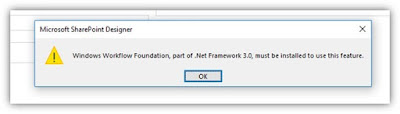
SharePoint Designer- Unable to open a workflow - WWF .NET 3.0, must be installed to use the feature

Every day is a learning day and If we don’t learn a new thing today, the day is wasted. I don’t think much of a man who is not wise...